


Film Lab FX - Film Emulation Plugin For Photoshop
Couldn't load pickup availability
Film Emulation for Photoshop
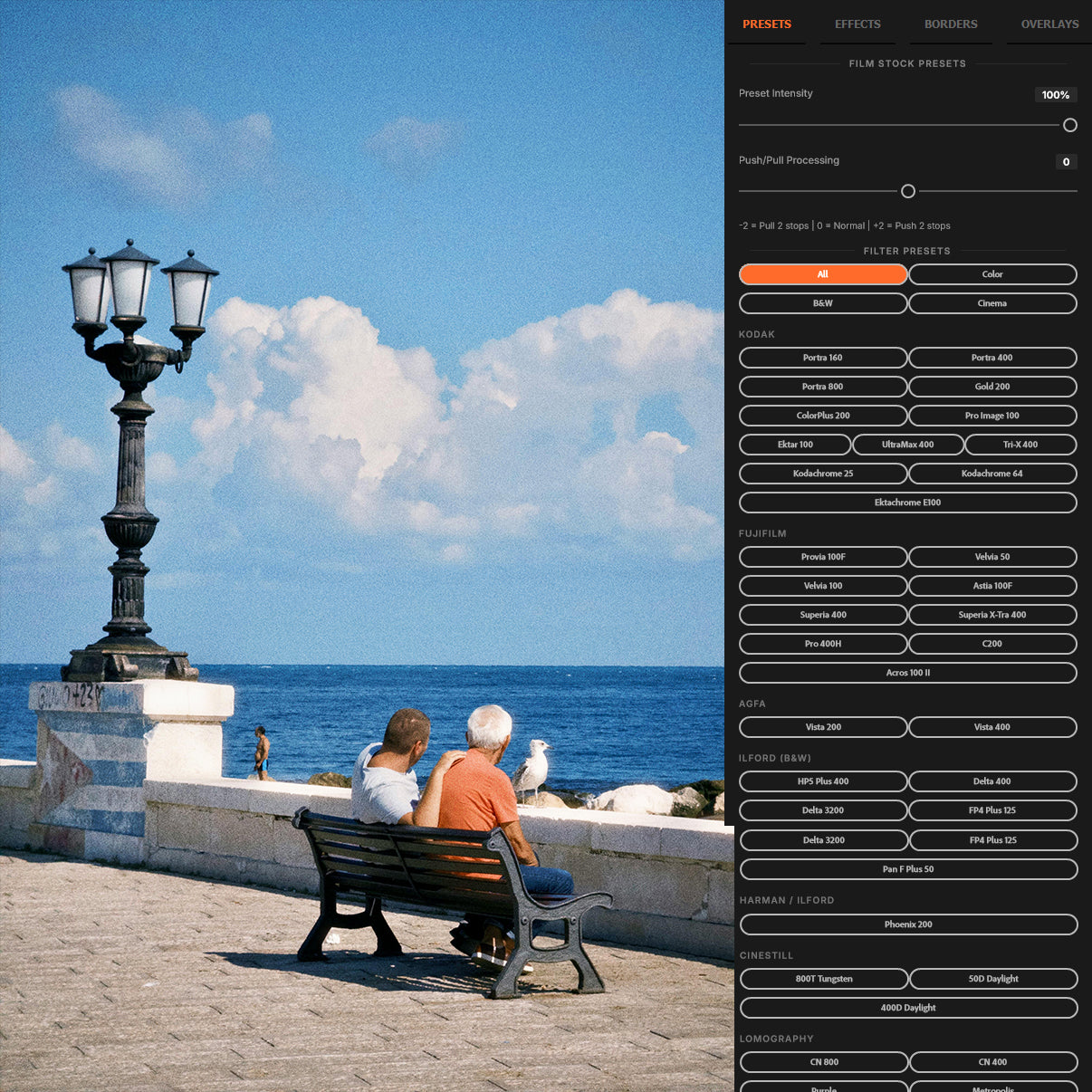
✓ Built from Real Film – 50 presets spanning Kodak, Fujifilm, Ilford, CineStill, Lomography and more, each built from real stock reference scans, not generic LUTs.
✓ A Complete Darkroom – Halation, haze, grain, vignette, split toning, color grading, tone curves, borders, and overlays. Every effect is non-destructive and lives in its own named layer group.
✓ Buy Once, Keep Forever – One-time purchase with lifetime updates. Every new preset and feature added to Film Lab FX is yours free, no subscription required.
How it Works
How it Works
One-click film presets. Manual effects that stack freely. Every adjustment lives in its own non-destructive layer group. Hide, tweak, or flatten at any time. Works on any image open in Photoshop.

See the difference
Analog warmth. Digital precision.
Drag the handle to compare. Every tonal decision - halation, grain, base curve, rolloff - modelled from real film stocks shot over a decade.


See it in action
Film Lab FX in action.
Watch a full walkthrough of the plugin. Presets, halation, haze, grain, curves, and colour cast, applied to real photos.

Halation / Bloom
That warm glow behind bright lights. Physically modelled.
Real film halation is light scattering through the film base. Film Lab FX recreates this with per-channel blur at film-physics ratios, giving you the characteristic red-orange glow around highlights that defines pushed film.
- Control strength, spread, sensitivity, and soften independently
- Hue and saturation controls shift from warm red-orange to any tint
- Isolates naturally to highlight regions only
- Non-destructive FilmLabFX_Halation layer group

Film Grain
Grain that breathes. Not digital noise.
Film Lab FX grain uses Photoshop's noise engine with luminance-aware weighting. It scales correctly with resolution and stays organic at 100% crop, unlike procedural noise that falls apart under scrutiny.
- Amount, size, and roughness controls
- Shadow-weighted: denser grain in mid-darks, just like real film
- Blend opacity control for subtle to heavy grain
- Non-destructive FilmLabFX_Grain layer group

Colour, Tone, and Grading
Base curves. Split toning. Color grading. All in one place.
Film Lab FX gives you a full tonal and colour toolkit in a single panel. Prebuilt tone curves for specific stock families, independent highlight and shadow toning, temperature and tint controls, and a fade slider that lifts the black point just like overexposed negative film.
- Tone Curve: highlights, shadows, and contrast via curves
- Split Toning: independent colour tints for highlights and shadows
- Color Grading: temperature, tint, and fade controls
- Each effect is its own non-destructive FilmLabFX layer group
50+ film stocks. One plugin.
Every preset is built from real film stock reference scans, not generic LUT packs. Kodak, Fujifilm, Ilford, CineStill, Lomography, and more. New stocks added with every update.
Kodak
Fujifilm
Ilford (B&W)
Harman / Ilford
Agfa
CineStill
Lomography
Konica
Kodak Vision3 Cinema
Cross-Processing
Special Processes
More stocks added with every update - included free.
Everything you get
One purchase. The full toolkit.
50 Film Stock Presets
Kodak, Fujifilm, Ilford, CineStill, Lomography, Agfa, Konica, Kodak Vision3 Cinema, cross-process, and special process looks. One click to apply.
Halation / Bloom
Physically modelled light bleed. Control strength, spread, sensitivity, soften, hue, and saturation independently.
Haze / Diffusion
Simulates a diffusion or pro-mist filter. Control strength, spread, and hue shift of the haze layer.
Film Grain
Analogue grain using Photoshop's noise engine. Amount, size, roughness, and opacity controls. Luminance-aware.
Vignette + Split Toning
Soft elliptical vignette with amount, size, and feather. Plus independent highlight and shadow colour toning.
Borders and Overlays
White, black, and Polaroid borders with live thickness slider. Light leaks, lens flares, starbursts, and bokeh overlays.
System requirements
Compatibility
| Software | Version | Windows | macOS |
|---|---|---|---|
| Adobe Photoshop | 2022 (v23.3+) | ✓ | ✓ |
| Adobe Photoshop | 2023 (v24+) | ✓ | ✓ |
| Adobe Photoshop | 2024 (v25+) | ✓ | ✓ |
| Photoshop Elements | Any | - | - |
| Photoshop CS/CC Legacy | Pre-2022 | - | - |
Requires UXP-compatible Photoshop. Install via Plugins › Plugin Manager.
From the community
Trusted by film photographers.
“The halation engine alone is worth the price. I've tried every plugin out there... this is the first one that actually looks like it came from a real darkroom.”
“Non-destructive, intuitive, and the grain actually holds up at 100%. My clients keep asking why their portraits look like they were shot on Portra. Film Lab FX.”
“Switched from VSCO + manual grain to Film Lab FX and haven't looked back. The workflow is so much faster and the results are consistently better.”
Common questions